
Join the discussion
Write your take first — we'll ask for email only when you're ready to publish.
- Hacker News
- When I see one of these with obvious AI tells at the top (sentences lacking a subject or verb), I ask myself:
Can’t I just open up a harness and prompt “Teach me how to do X?”
by trollbridge - I personally do this, ask claude code to teach me about concepts I don't know about when it codes something, and only then I accept what it suggests to meby GL26
- I do this all the time, I have a skill/gem with instructions on how I want to receive info, how to format and so on. Really helps to go fast to get the point.by lfx
- Reminiscent of Steve Friedl's excellent work: http://www.unixwiz.net/techtips/ssh-agent-forwarding.htmlby chb
- It’s amazing what you can learn by reading the manual.by teddyh
- It's amazing how badly written most manuals are.
- It is, because manuals are often not the best way to learn things. Most software manuals are reference manuals. SSH man page isn't too bad. I learned most of my SSH knowledge from it, but I'm not sure it's the best way to do it.
- If you have many different remote devices behind NATs or firewalls, a cool trick to access them all via EC2 server (or such) is to setup Remote Forwarding via UNIX socket on the server side, to devices' port 22. Preferably, UNIX socket filenames should start with a common prefix, so an SSH config can be written that will use ssh+socat in a ProxyCommand to establish the connection.
It's amazing how lightweight this method actually is. I have managed to connect hundreds of devices using a single EC2 nano instance.
by bheadmaster - Do you have more info on this method? How is the remote forwarding actually done?
- I think the more modern ProxyJump rule is superior for this. Just let it manage the actual TCP forwarding for you automatically. It's just the normal "bastion host" concept.
Particularly, you can use name patterns to apply the same rule broadly, assuming you have some systematic naming scheme for your eventual target devices.
by saltcured - BTW I use this and a systemd unit file and SSH tunnel my Jellyfin to a public VPS to its local host.
I then use nginx to proxy it.
Because its a unit file, sshd reconnects if my ISP's IP changes. Does so within 30s. Also hides my ISP IP in case I have to turn it off.
And no data is effectively on the VPS. Its just a mostly empty machine.
by nekusar - Hak5 video that helped me understand many years ago about the practical usage of SSH forwarding
Hak5 - SSH Forwarding: Local vs Remote with examples, Hak5 1113 part1 https://www.youtube.com/watch?v=g_Row8zEJZc
by pss314 - Learning how SSH port forwarding is great as a pseudo-vpn for everything from GUI-client database access to (in physical infra) access to web-admin tools for appliances.
The socks proxy support can also deal with bad web filtering and privacy issues on public wifi networks (though nowadays if you're ssh'ing to a cloud IP, you'll get lots of "bot" restrictions).
by hylaride - > The socks proxy support ...
I just love SOCKS proxy in SSH tunnels: at some point I had a dedicated server (on a fixed IP) with countless machines (usually headless Pis dropped at a family member's place and/or SME office) automatically setting up, 24/7, reverse tunnels to that dedicated server.
Then I could, from anywhere, both access their LANs (to fix stuff) and have a browser, running locally, pretending to be in this or that country.
Basically because I had all those reverse tunnels always there, I could always decide how to use them (just SSH in or SOCKS in etc.).
- Yeah, I get use out of the SOCKS proxy mode in combination with a "split VPN" at work.
I need VPN to get into some internal resources via SSH, but there are lots of external/public/AWS resources I also need to access, and the full VPN adds too much overhead and fragility for those.
Using the available split VPN, I can point a browser instance at a localhost SOCKS proxy port to relay over SSH + VPN for other web resources I need to access internally.
Unfortunately, Firefox proxy config rules are sort of backwards for my needs. I want to say "only use proxy for these 3 domains" whereas it wants to use the proxy by default and only allow me to bypass specific domains.
by saltcured - Need to mention sshuttle [0] here, as it magically solves a bunch of these problems without constant reconfigurationby smw
- sshuttle is amazing. I've used it extensively on stupidly configured networks, super useful tool.
- Yup, use it regularly in order to jump through networks where a VPN/Wireguard setup is not possible. It can also forward DNS requests and handle local NS operations reasonably well, such that it can be used as a low-key split-VPN client (i.e. only forwards traffic for a specific domain or IP range without redirecting any other traffic). Note that for integration with `systemd-resolved`, one needs to jump through a few hoops, but I feel its works very nicely: https://github.com/sshuttle/sshuttle/issues/688#issuecomment....by hansvs
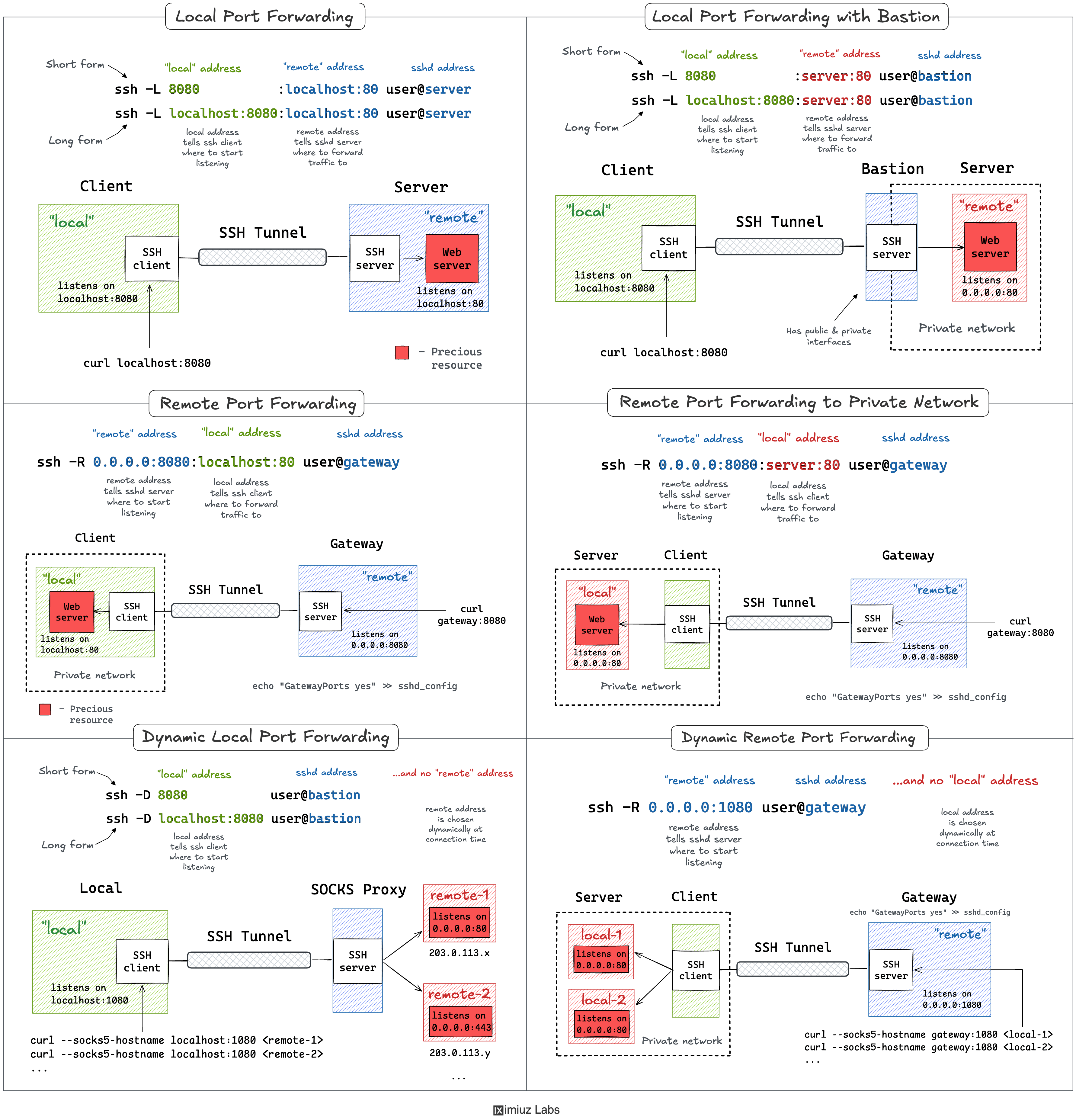
- The article mentions bastions, but no jumphosting?
Edit: Jumphosting was introduced in OpenSSH 7.3 2016-08-01.ssh -J user1@bastion1,user2@bastion2 targetuser@targethostby chasil - >ssh -J user1@bastion1,user2@bastion2 targetuser@targethost
Are you using SSH key auth or password authenticating three times when you do this?
by m348e912 - And with match/exec rules you can always connect to MyHost and make it conditional whether to use a jumphost or not, so it's like an on demand vpn.. only with ssh.
Match host="MyHost" exec "! grep Home ~/.wifi-loc-control/.current" ProxyJump home-jumphost.mydomain.tldby 05 - For me, this is always used via ProxyJump rules in my ~/.ssh/config
It is also nice that it works recursively, so I can logically structure my rules so that the one for my regular targets say to use bastion1, then the rule for bastion1 says to go via bastion 2, etc.
I find this easier to reason about and maintain rather than juggling a bunch of these multi-step rules.
by saltcured - What I've found beautiful about -J is the host you jump through requires no privileges on the final host. Only my laptop has the SSH key to access my home server, not my cheap VPS.
And this allows me to have zero open ports on my home internet. I do a reverse tunnel to my VPS from my home server (in a FreeBSD jail), and that port is what my laptop client jumps through.
by idatum - It is surprising how many times I see this content (this version might be marked “Published: Jun 19, 2026” but I've definitely seen those exact diagrams before, starting at least a few years ago, and the same content around them in many tutorials before that) without it being updated to mention jump-hosts.
Support was added to OpenSSH about a decade ago? Even on a low moving Linux distro like Debian/LTS everyone should have support by now.
by dspillett - I never pass up an opportunity to recommend the Cyber Plumber's Handbook: https://github.com/opsdisk/the_cyber_plumbers_handbook
Goes over similar content as TFA, in perhaps a little more depth. Indispensable sysadmin knowledge.
by wbadart - so good, I learn new things.by susu1111
- Appreciate the mention wbadart!by opsdisk
- Not mentioning the ssh -w option in that book should be a crime.
- I'll mention it here, because I learned about it here.
"~C" will drop you into the SSH command line, allowing you to, among other things, effect port forwarding
Learning that "~C" exists, and what you can do with it, has supercharged my use of SSH tunnels, which were already awesome on their own.-L8080:localhost:443But for some reason this has been disabled by default in more recent ssh configurations... to ensure its available
or, in your ~/.ssh/config-o EnableEscapeCommandline=yes
(edit: formatting)EnableEscapeCommandline yesby buredoranna - Eh, once I started using master sockets, I never went back. Problem with ~C is it's hard to keep track of what you have open.by jojo2354