
Join the discussion
Write your take first — we'll ask for email only when you're ready to publish.
- Hacker News
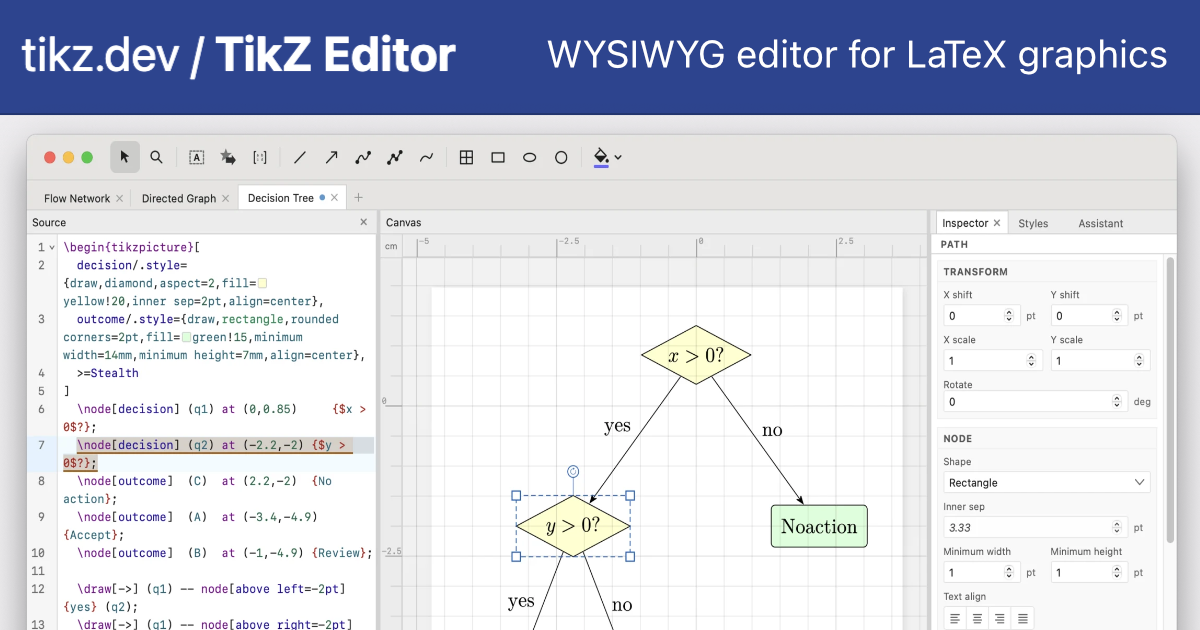
- This is superb. Will you consider adding support for pgfplots[1]? When I was a student I was long considering writing a native application for real-time TikZing.
- I think pgfplots should in principle be possible. I've postponed it thus far because pgfplots is GPL licensed, while the editor is MIT licensed, so I would need to distribute pgfplots support as a separate add-on. But in due course, putting in add-on infrastructure could make sense, because it would also allow adding support for stuff like tikzcd and CircuiTikZ (or tikzpingus!).
- I'm running Linux Mint (xfce version), and I installed the .deb version (TikZ.Editor_0.4.0_amd64.deb). It's very odd...for example, when I open it or do File/New, many (but not all) of the grid cells are rectangles, not squares. Am I doing something wrong, like installing the wrong version? Or maybe misinterpreting what the faint grey lines are?by mcswell
- Yeah that's odd, the grid should be square. Is the web version looking correct in the browser? Feel free to paste some screenshots into https://github.com/DominikPeters/tikz-editor/issues and I can look into it.
- The killer feature for me is not drawing TikZ visually, but being able to touch old TikZ without turning the source into generated-looking soup.by Littice
- Exactly, I wanted to avoid that. In contrast, if you open an SVG in (for example) Inkscape and make a minimal change and save, the resulting file has little to do with the original.
- All STEM students and researches from the world thank youby GL26
- Looks really nice. You might consider adding some presets to make it easier to get started, like some common neural net architectures and other use cases for TikZ.by sorenjan
- Good idea. There is File > Open Example, but it could be extended for sure. On desktop you can even directly open an arXiv paper!
- This is cool!
I know people like it, but I hate writing TikZ manually, to the point that I've mostly moved most of my technical-ish drawings to draw.io/diagrams.net, and then just export to a PNG. I feel like it's inelegant, but it works well enough and it's easy to make something that looks ok. Generally I'm all for text-defined stuff.
I have moved some of my stuff to Mermaid when I know my stuff is going to live in Markdown but I've not tried to get that working in TeX.
That said, I would like to use TikZ just because it's kind of the idiomatic way of doing diagrams in LaTeX, so a WYSIWYG might be useful.
One suggestion, I would like the arrows to be able to "attach" to the boxes, as in the arrow endpoints can move when you move the boxes. That's how draw.io does it.
by tombert - Can't you save a drawio file as .drawio.svg?
I've done diagrams with it a few times and just used Computer Modern to make the diagrams look the same as the text. Good enough.
by sureglymop - Attachment works for (text) nodes because they have anchors - you should see green attachment dots when drawing new lines or moving existing lines.
When using draw.io I’d suggest exporting to PDF instead of PNG so you keep it as vector graphics.
- As a student I really wanted something like this. Thanks for making it open source. My theoretical computer science prof happened to be Till Tantau the inventor of TikZ. An awesome communicator too.
- Schleswig-Holsteiners are everywhere :) Till Tantau also started the beamer package for making LaTeX presentations. Both beamer and tikz are very important contributions to science communication.
- This is very cool, but I'm going to say the inevitable...
How hard would it be to support cetz? I'm not touching LaTeX if I can avoid it, but I'm using Typst all the time.
- Probably quite doable with a coding agent.
There is a full wysiwyg (vibe-coded) presentation software based on typst available which partially implements exactly that:
by hw__ - Neat! I also enjoyed https://q.uiver.app/ by https://github.com/varkor which is a bit more specialized.by j2kun
- I used lyx during university. Was super happy. Still have all my homework and lecuture notes.by ixsploit
- Yes, there are several editors for more specialized things. Other nice examples: https://tikzit.github.io/ and https://www.circuit2tikz.tf.fau.de/designer/ and https://tikzcd.yichuanshen.de/
- Ah, I love CircuitiTikZ. Only way to do simple text-based circuit diagrams.
https://ctan.org/pkg/circuitikz?lang=en
https://github.com/circuitikz/circuitikz
Some years ago I wired it up with `asciidoctor-diagram` so we could have simple circuits in our Asciidoc maintenance manuals. The techs loved the hell out of it, and we could collaborate on the things in a git versioned ecosystem vs whatever fresh hell the PDM/ERP had for us.
A very nice complement to the already awesome WireViz (https://github.com/wireviz/WireViz)
by lopsotronic - If people are curious, I've worked on this project since February 2026, relatively consistently. In that time, through Codex, I've used around 700M tokens for this project (not counting cache reads), which at API rates would have cost $15k (but I actually paid only around $500 in ChatGPT subscription fees).
- I've tried it now a little. The UI looks very cool, and generally the project is cool so congrats!
However, the generated TikZ code is not good in my opinion. Everything uses absolute coordinates, which in TikZ is seldom needed.
Just to start, if I place a single node I get absolute coordinates for it. Why? If you just write `\node {Hello};`, TikZ will put that at the center of the bounding box. No need to tell it's at `(0.5,2.91)` like it's happening in my test. Then features such as "align bottom" for a selection of multiple nodes should are manipulating the absolute coordinates instead of using TikZ's alignment features (anchors etc.).
I understand generating such code is more difficult. Maybe it can be something to point at for the next version, who knows...
by gignico - Feel like could reference how those CAD script languages do it.by asdewqqwer
- Thanks, this is good feedback. I think the difficulty lies not so much in code generation, but determining what a user would expect. If I click the "align bottom" button, I would be surprised if
suddenly were to get a new randomly named \coordinate and relative coordinate notation. On the other hand, if you start out with "nice" code, the app will in many cases refuse to let you drag things since it doesn't know (and in many cases can't know) what the drag should mean (do you change the named coordinate or change the offset to the coordinate etc).\begin{tikzpicture} \draw (0,2) rectangle (1,1); \draw (1.5,2) rectangle (2.5,1); \end{tikzpicture}Elsewhere in this discussion, we talked about positioning like "right of", and some good suggestions were made (https://news.ycombinator.com/item?id=48647683).