Join the discussion

Write your take first — we'll ask for email only when you're ready to publish.

  • Hacker News
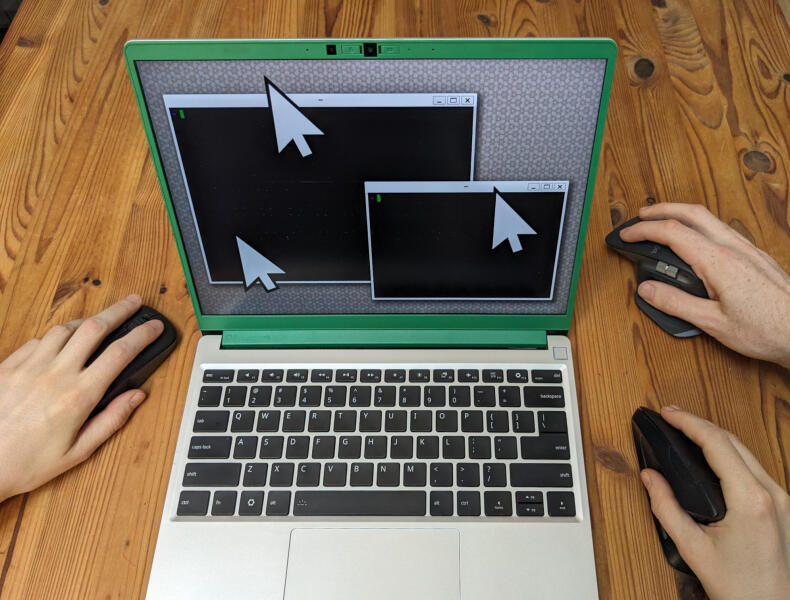
  • I remember the multiplayer of Mahjong on the Amiga worked by just plugging in a second mouse. Voila, two pointers.
  • I have fond memories of playing Settlers in split screen this way on the Amiga
  • I have been dreaming about a split keyboard with dual trackballs and two cursors for the past few months. This may be the kick i need to actually get on it.
  • They didn't call them mouse cursors with Ataris and Commodores because almost nobody had heard of a mouse, but there was more than one joystick port so multi-player was built-in from the beginning.

    I hadn't heard of a mouse either but when the trackball appeared, mainly to play Centipedes and Missile Command, I used it as a single-button mouse anyway, not only to point & click but to drag & drop which I had never seen demonstrated.

    So I made a little 2-player game, not fancy, each player stayed in their own window.

    Of course nobody had ever heard of "Windows" either since MS-DOS wasn't even out yet.

  • Don't let your dreams be dreams; there is the Svalboard Datahand [0]. Though, you may need to sell a kidney to purchase it.

    In fairness to the creator, it's a niche product that would have taken quite some time to develop.

    I quite like BenVallack's video about the Svalboard [1] (and his videos in general about his journey through the world of split keyboards).

    [0] https://svalboard.com/

    [1] https://youtube.com/watch?v=-Lz_FNoYHNM

  • I've always thought this was a cool idea. It's obviously been on the minds of Wayland protocol developers since the beginning, otherwise it wouldn't be possible!
  • Wayland: you can have two cursors but no, you can’t have screen sharing.
  • I thought it was the other way around, X11 has supported multiple cursor since 2009 and Wayland didn't add support for it since toolkit developers weren't making use of it anyway.

    Enabling in X works via:

        xinput list  # find second mouse id
        xinput create-master second
        xinput reattach <mouse-id> "second pointer"
    
    and to get rid of it:

        xinput reattach <mouse-id> 'Virtual core pointer'
        xinput remove-master 'second pointer'
    
    Works great for clicking, but keyboard doesn't work in some applications when enabled. Dragging windows might attach them to the wrong cursor and other issues. Playing around with xinput can also crash some apps (libgdk-3 here) or leave you in a state without a keyboard or mouse.
  • On the web, PointerEvents and touch events both support multiple different cursors. https://developer.mozilla.org/en-US/docs/Web/API/Touch_event... https://developer.mozilla.org/en-US/docs/Web/API/PointerEven...
  • You’ve been led astray by the altered title on this submission. The web does not support the concept described in this article (seats) at all. It supports tracking multiple pointers, but it’s all still single-player, in the terminology of this article: you’re still limited to single focus, single typing, single pointer.
  • This feels like a step in the right direction from this talk on desktop UX. Finally some cool innovation here!

    https://youtube.com/watch?v=1fZTOjd_bOQ

  • It's not quite innovation, from TFA:

    > X11 (the X Window System) has its own multi-seat extension called Multi-Pointer X (MPX), which I also had a lot of fun with a couple of years ago.

  • cant read the entire article on ios because the left part is just somehow cut off :(
  • Same on Android, insane that people aren't validating for mobile in current year
  • I wish libinput gave the option for pointer inertia, where the pointer glides to a gradual rather than a hard halt after you stop moving it. I’m limited to a trackpad these days and it’s a really nice feature on my Steamdeck that I’d love to have on my Thinkpad.

    Come to think of it, Steamdeck is Wayland? How do they implement it?

  • Semi-related - I think that controllers would be a very nice single input device for many kinds of workloads, especially if you can occasionally just dictate text. It's kind of sad that it's not supported all that well.
  • > How do they implement it?

    In firmware.

  • I highly agree. The synaptics driver on an Asus Eee PC I had had this feature and I really liked it. It just makes sense: It is a thing you touch and flick around. Having it immediately stop is like the list you’re scrolling immediately coming to a hard stop once you release the finger.
  • >I wish libinput gave the option for pointer inertia, where the pointer glides to a gradual rather than a hard halt after you stop moving it

    Why? That seems like it would make it a lot harder to move the cursor precisely. (in fact the main implementation of it on linux I know of was a joke in IOCC)

  • I'm building a compositor now, and I've been thinking about multi-seat from the beginning, but I know there are lots of places that assume a single seat, and so this sort of thing won't work for me. It's actually a lot more work than you'd think to support this...
  • I keep thinking of trying to see how far I get re-doing Niri in River.

    The one other constraint that I'd really like to see relaxed is about displays, about being able to merge and subdivide screens as I please. Having a huge ultra-wide display really would be so much better if I could divide it up somehow. This is kind of the headline feature of stilch, which is a pretty neat compositor, https://github.com/wegel/stilch .

    Niri has some tickets on it too. Merging monitors into a big display, and splitting a display (moments before the multi-pointer ticket was filed in Niri), https://github.com/niri-wm/niri/discussions/1285 https://github.com/niri-wm/niri/discussions/3160

    There's been all kinds of rough incredibly hard things going on with Niri just trying to figure out how to handle some of the more interesting copy-paste scenarios, and with really weird sequencing issues across basically ephemeral inputs, that have really plagued the project and made life incredibly bad for downstream apps. This is just my opinion, man, but I think the lack of ambition about these ridiculous over the top features eventually starts hampering what turns out to be relatively prosaic asks. Better models for multi-seat, multi-cursor help scenarios like remote-desktop, and video-chat remote control, that at first don't seem needed, but are fundamentals that pay dividends if you shoot for them.

  • > It's actually a lot more work than you'd think to support this...

    Like: how would one support multiple keyboards? Is there an experimental or logical model for that?

    by bch
  • Given that a lot of the use case is interacting with two different programs simultaneously, even just supporting it at the compositor level is pretty valuable: then it should "just work" for that use case. You can't really do a whole lot about the fact that most Wayland clients are making assumptions about seats; well, you can, but that's a lot more work...
    by jchw
  • One very nice use case that I haven't seen anyone else talk about is touchscreens.

    I have assigned my touchscreen to be in a separate seat. This allows me to interact with apps without moving my cursor or changing my window focus.

    For instance: web browser on the left, with a document. Text editor on the right. I am writing some notes with my keyboard, scrolling the document with my touchscreen. The editor stays focused, no back-and-forth with the mouse. It feels very natural this way, instead of having your cursor jump where you touched the screen and change your M/K focus.

  • The original title, "State of multi-player Wayland" is a much better summary of the article. This ain't just about the pointers! In fact, the author is very explicit about that:

    > I think there could be a term that’s describing this concept even better – in the title of this post, I picked “multi-player”, to make clear that it’s mostly about multiple people who are collaborating. I’ve also seen “multi-cursor” or “multi-pointer” (which are missing the keyboard component).

  • In fact, you can also have a different touch input devices per seat!

    I'm not aware of actual hardware that would make this feasible, but if you invent a touchscreen which recognises between two people's different fingers, you could have a client which tracks who clicks where without any protocol changes.

  • I have never liked split keyboards but I might if each keyboard was also a mouse with its own cursor, it seems fun to develop the skill to work that way. Would also be useful at times if the the Thinkpad trackpoint and trackpad could each have their own cursor and I could leave one somewhere. Or maybe a cursor stack like pushd/popd, registers would probably work better; instead of virtual desktops just give me one massive desktop with cursor locations I can jump between, switch to cursor 3 it saves the location of the current cursor and jumps.
  • I have a UHK split keyboard with a keycluster module (which has a small trackball) on one the left half and a larger trackball module on the right half.

    Even though there is only one cursor it's been a really powerful way to work, being able to control the mouse with either thumb.

    Then there are the alternative keybindings that allow moving the mouse using the wasd keys as well.

  • Wayland seats are sets of inputs, to be handled together, each seat having its own cursor position, focused element, and so forth. That’s not what you want, I believe.

    … unless you do want the left half of your keyboard to type into one window, and the right half of your keyboard into another.

  • >I have never liked split keyboards but I might if each keyboard was also a mouse with its own cursor

    You might enjoy the KeyMouse (https://www.keymouse.com/).