
Join the discussion
Write your take first — we'll ask for email only when you're ready to publish.
- Hacker News
- I don't think we should homage GUI for AI agent workflows. The terminal and Mac GUI are 100% deterministic when you click an icon, but I'm not sure if visualizing agent workflows is the right call.
The problem is that AI workflows are inherently different for each person.
The current approach feels like it's forcing a CLI-based model on users. I also don't think chat is a suitable fundamental unit for task delegation.
I've worked on writing a compiler using both hand-written code and AI. Once the project exceeds a certain size, the chat itself becomes a bottleneck. In those cases, I needed proof and gates like Rocq. So in essence, AI coding requires clear negative gates that should be rejected when approaching the goal.
I think something like Figma's canvas model might become the new interface.
Because no matter how meta you make it, agent workflows are ultimately optimized for the individual. My settings often don't match someone else's.
Computers also have this problem, but in that case, you can enforce defaults. With AI agents, it's different.
That's why I think we need a canvas—something like a workspace next to the user space where agent workflows can be dynamically adjusted.
I focus most of my coding effort on building gates that AI-generated code must pass through when it's being produced. That approach has allowed me to handle much larger volumes of code.
The future agent GUI will be about supervising multiple asynchronous tasks.
In a way, this might end up resembling object-oriented programming—just with task graphs instead of object graphs.
Once AI starts generating code, it flows out like water through a burst dam. It's impossible for any human to fully understand it all. At first, I tried to understand every line, but that actually turned out to be less efficient than just writing the code myself. There's a clear fundamental mismatch between the way AI thinks about code and the way I do.
This mismatch seems like an unsolvable impedance mismatch problem—similar to the one between ORM and SQL. So once you decide to use AI agent code, you have no choice but to shift your focus from reviewing the code itself to trusting the gates you've built around it.
The key question is how tightly you can build those gates. And I don't think chat-based interfaces are capable of providing that level of control.
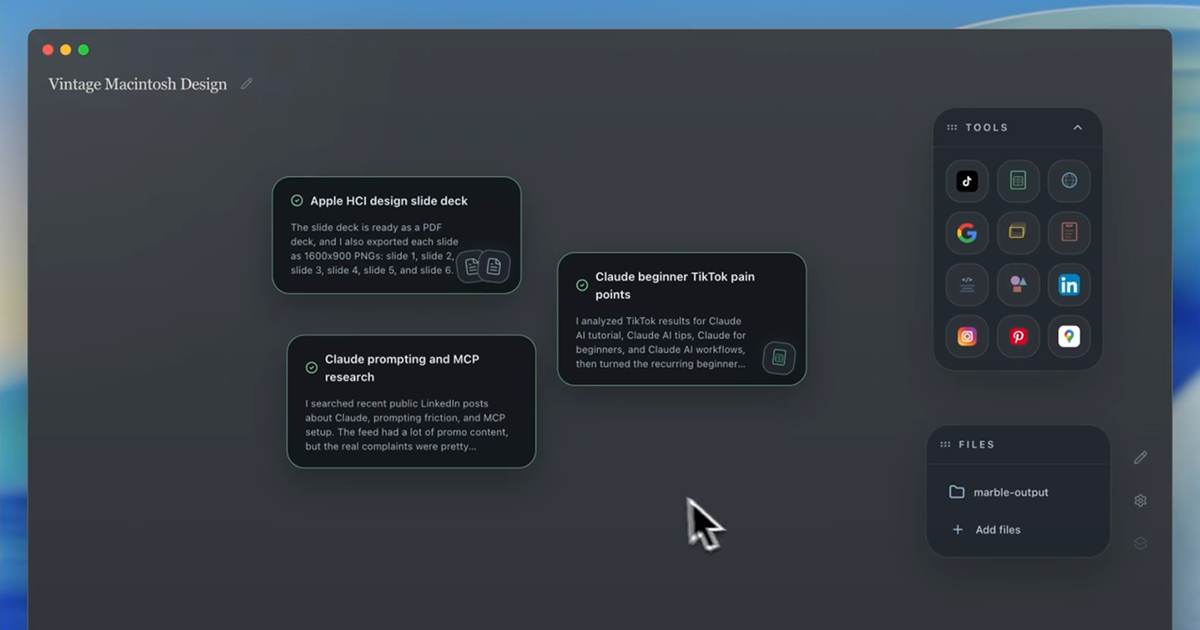
by jdw64 - Totally agreed that chat interfaces won’t be sufficient to enforce complicated gates. Our interface does have the concept of a workspace, where you can see all the cards at-a-glance within the workspace. But graphs, or otherwise finding a way to have the tasks interact with each other, could be an interesting direction.by akbabu
- When I initially saw this I was excited because what I’m trying to solve for is visibility of both semi and fully autonomous and agents at runtime. Marble is an improvement over chat and Claude but it’s incremental IMO.
We’ve toyed with a meta agent style interface which you chat to do everything. Add tools, connect datasets, build agents, deploy and schedule them, build skills, etc.
But at some point agents have to have an interface for human approvals, validation, training, and tuning.
I guess it’s like a spreadsheet. Ultimately agents are part of custom apps which are each going to be as unique like snowflakes. So it’s difficult to have one standard abstracted runtime interface without feeling obtuse to a business user. I think what I’m describing and wanting are new app layer building blocks vs one interface to rule them all.
All of this said, I’m all for a better personal llm harness interface (which is what this is). So keep up the great work guys!
by jaynate - I believe, fundamentally, that interacting with AI will increasingly move in the same direction as interacting with coworkers.
Slack, video/audio meetings, shared screens, paired programming, cooperation in the classical sense. I expect humanoid robots to be a standard part of life by 2050, so then they'll be able to complain about the coffee at the office like everyone else, I guess.
by jaggederest - I think AI will be like electricity. Invisible.by rolymath
- The demo video is a great example of one thing I have been saying for ages - the quality of the LLM output depends heavily on the communication skills of the user.
Some people say AI is great and some people say AI is terrible - but how can anyone compare these things because they depend so much on the skill of the user.
Case in point - the demo video. The user says "find me all the HCI articles on hacker news" and then a research task started... ok great so far.
Then the user says "they should be made into slides"
What exactly do you mean by this? Do you mean "from the set of results you found, narrow them to be only the ones that have been made into slides" or does the user mean "I would like you to then take those results and make them into slides"
There will be people who read this and say its obviously the former and people who read this and say its obviously the latter, and neither of those is the point I am trying to make, the point is that its very ambiguous and if the AI did the "wrong" one, then the user would complain that AI is garbage but the real problem is that the instruction was very unclear because the users communication skill was poor.
by malux85 - Drop the "G". The best UI for AI Agents is a physical UI (not a graphical UI). Do something like PikaCube [0] and disrupt the mouse.by ckmar
- I think it should look like this: https://www.dreamcoder.ai/
A smart, tiling window manager with workspaces and a great tool harness. An everything app, if you may; bring the terminals, code reviews, etc. into the tool itself, and make it high fidelity: no blocky terminals for the app itself.
by mickeyp - I just have a bunch of agents in $CHAT_APP.
Don't see the need for a special UI.
by dingaling911 - Lost me at having to click to use particular toolsby johngoode
- Embrace mouse superiorityby slopinthebag
- I think there is going to be an intersection between a personal operational dashboard like this and the UI for an AI Company.
I've been predicting for awhile that 2026 is the year of the AI Employee (or serious attempts) and 2027 is AI Companies.
I have been seeing RFPs recently asking for end-to-end solutions to operate companies in particular industries with the goal of day-to-day only requiring infrequent human-in-the-loop.
Anyway, if you think about what for example some professionals might use a Marble like tool for, say managing their freelance business. You might want to create a task and then promote it to be scheduled and then have that artifact like a report have a dedicated place on the screen.
The difference with a vertical is that you will know a lot of the reports and data types you need ahead of time. The advantage with just prompting things dynamically as you go is you get exactly what you need and don't have to sort through a bunch of features that aren't important to you.
Even though a business vertical is qualitatively different, you still might use the same system to build it. Maybe something like a self organizing AirTable. A set of projects as departments.
Sorry I started rambling nevermind.
by ilaksh - It does feel novel.
However, I believe the GUI for AI agents that will win is a plain text editor with a file tree, a terminal pane for coding (or preview pane for other kinds of tasks) and a chat sidebar.
Even if the code editor is not used to type, it's there for psychological safety. It lets you inspect and navigate what is being created. Has tremendous value.
Plain text has survived countless software revolutions, so it's likely to become the dominant format for artifacts produced by AI. Non-plain text things are likely to adapt instead of the other way around.
"Strange terminal commands" have survived, while even poweruser toolbar style have started to fade (I love them, but they're fading away). It clearly has some value (hint: speed over familiarity).
I think the poweruser toolbar style was indeed the only thing in the past couple of decades that really tried to match the terminal for speed of interaction. In my opinion, it succeeded, but it has its limits too (tends to clump with stuff over time; has a limit on the amount of abstractions it can hold). I would love to see a candidate GUI that tackles that speed angle.
by gaigalas - Plain text is great for transmitting information that's already specified, but human intent doesn't come out fully formed. Plaintext alone won't be the main way for humans to express intent and interact with an agent.by akbabu
- > the poweruser toolbar style
These can be great for discovery. But one must-have for me is a unique keyboard shortcut assigned to each button on the toolbar. Because if I use a feature often, I would 1000x rather use the keyboard to invoke it than have to drag a mouse to click a button.
by slfnflctd - I broadly agree. Plain text formats remain consistently accessible and flexible.
That said, arguably the dominant AI artifacts are binary images, video, audio.
The "preview panes for other kinds of tasks" will be a big deal. Humans tend prefer rich text editors (I think?). Also spreadsheets, page layouts, node graphs, timelines, hex editors, ...
So maybe the preview panes are actually editors themselves? Speaking personally, I enjoy closely coupled combinations of underlying plain text representations with task-specific UI on top.
by contrast - Best interface in my opinion is a git tracked folder, files as state, agents coming in and doing work. It's not just a chat interface because in chat mode everything flows like water under the bridge. It is files as agents, where you get the agent to write a task in a file, and then it updates the file like a blackboard as it performs work. Same task file can be seen by worker agent, multiple judge agents (for plan and implementation), documentation agents and reflexion agents (improve workflow). I would also track every user message in a chat_log.md for reflexion agents (what is wrong with the workflow) and intent review (is the agent still following user intent?).by visarga
- Sure but this is a very software engineer coded answer
What about people who don't think like you
by jaapz - I completely agree with you that the chat interface is very undercooked and there's a big untapped space for agent-first interfaces, perhaps even replacing traditional desktop metaphors. You're spot on with your premise.
With that said, from the material you show in your homepage, it still seems like you're doing something very similar to OpenAI and Anthropic's first party apps? I think it would help your pitch if you could show some task or workflow where your interface truly makes a difference; loading files and asking questions about them is a staple of most harnesses.
by qsort - I just want a clean way to manage chats, projects, and research. I mean I know I can pin so many chats, and I can group things in projects.
But I am doing a brand design project with nearly 30 - 40 chats in one project at the moment, and the fact that you can't rename a chat from within a chat (or even see the autogenerated name for that point). You can't tag or apply any logical grouping to chats in a project i.e. Logo, Wordmark, Email Footer, Social Branding, etc.
I spent a long time going through all the chats manually and then giving them a naming convention with tags built into the titles so that I can navigate the chats in my project. Even then, I still have to scroll through the whole list to find what I want.
by CWhiting - I think a better example is how Marble makes tools visible and easy to select for each task instead of requiring you to remember what exists or describing everything through the prompt.
Marble keeps the tools you use most close at hand and will surface other useful ones for the job. Combined with a birds eye view of multiple tasks running, it makes agent work easier to set up and manage. The goal is to minimize cognitive overhead in day to day tasks (both in specifying what you want, and managing after you ran something)
- I'm glad folks are experimenting with different paradigms.
That said, Hacker News might not be the best audience for this informal survey. I'd wager at least 70% of the people reading this are still interacting with their computers using "strange terminal commands", by choice. We aren't representative of what normal people will use or prefer.
by tdeck - True, "strange terminal commands" gave me such a visceral reaction. "Its GUIs that are strange, with their strange buttons in different shapes and forms".by dormento