
Join the discussion
Write your take first — we'll ask for email only when you're ready to publish.
- Hacker News
- If someone made a Libby client for this, it would essentially be perfect for my uses.by bragr
- This is excellent - I’ve been looking for a reliable way to get a manga reader onto my Kobo for a while now, specifically one that can directly connect to sources like MangaDex. The alternative I’ve settled on is to download to my PC, bundle with KCC into a cbz, upload to Dropbox and then download onto the device’s local storage. It takes far too long. I’ve been considering writing something myself but I’m not familiar with the device hardware or OS… this is definitely going to save me a ton of time. I don’t care if this was created with LLM assistance, I’m just happy to have a viable alternative in an approximately closed ecosystem.by Method5440
- Read the porting document - do we think this would be a difficult port to the Libra Color? I’m reluctant to order a Clara BW in addition, but also not sure I know enough about the ecosystem to contribute a working port. Anyone interesting in teaming up to take a crack at it?by Method5440
- I can help to port it for your device if you can help by testing it on your Color.by thepoet
- For most of the use cases I would need an app for, koreader's plugin system works just fine for it. You'd be surprised the gems you can find for koreader.
- It would be very cool to have an Obsidian viewer or something.
On many occasions I have compiled notes, sometimes manually created sometimes LLM curated, and put them into a .epub file to send to my kindle so I can read as I am out walking.
It would be cool to skip a few steps there, and have "live" documents at the ready, particularly in markdown if possible, without having to sync/publish etc
by locusofself - Isn't the whole point of Kindle (or other ebook readers) being able to read books without distractions?by Artgor
- You can read books on an iPad without distractions just fine. Just turn off all notifications...by nottorp
- Even if you want it for just books, there are benefits to installing things like KOReader (way better ebook reader than the default). This allows you to sync with Calibre, etc.
Years ago, it was practically a hobby of mine to go to my local Goodwill, and find an extremely cheap old used Kobo and find someone to donate it to. Now I'm thinking of getting old Kobos just for the eink display so I can run simple apps on it - while continuing to use my regular Kobo as an ereader.
by BeetleB - Some people came for the compact package containing an eink screen, a moderately powered application board, and a reasonable amount of battery and storage. For some, it may be the perfect thin client.by NewJazz
- In the case of the kobo, it is firstly a much more open platform than kindle. Secondly, existing projects have made much more performant reader apps than the stock one. Basic kobo (nickel) is a bit slow and can be even slower with a “bad” EPUB file (you will come across many online as they are often auto generated from other sources and are essentially a collection of html files). Installing a third party reader can make page flips and re-renders significantly faster and smoother as well as remove all unnecessary network processesby allthetime
- I went through a whole design phase with ChatGPT on the idea of using an old Kobo as a low-distraction TV remote for my dad. The idea is that it would interface with a computer media server thing, be more legible than a traditional remote, and not be an app on his phone that would immediately send him into his phone.
Ended up being more involved than the benefit it would bring, especially considering that these media server programs know how to interface with the traditional remote over HDMI (if you have the right graphics card or a dongle) and show the selection UI on screen like a smart TV.
Anyway, my response is "you don't necessarily have to complicate your e-reader, instead you have the option of making it not an e-reader."
- That's what I want from my e-reader device too. Yet being able to turn a $140 e-ink tablet into a general purpose tool is really neat.
- No, the whole point is the e-ink screen. Kindle has had a web browser since the very first version, and people have managed to read books on it just fine without distractions.by paxys
- There's a contingent of enthusiasts who, once they find out a device runs Linux or can run Linux, seems determined to expose a terminal on it. I don't know why someone needs to SSH into their toaster, but damned if they're not gonna do it, just because they can.
Me personally, I just want a reliable toaster.
- My wife bought a kobo as it allows her to use the local libraries ebook collection, rather than spending hundreds of pounds at amazon for the kindle.
It was starting to die and had screenglitches. After a bit of debug, it turns out that hacking the kobo is dirt simple. You open up the back, and replace the SD card. thats it.
There is a large community that have created toolchains and guides. there is of course a port of koreader (https://koreader.rocks/) which has a lua interface for making your own apps.
by KaiserPro - KOReader is amazing, I had an old Kobo Clara HD that I almost had given up on, and after installing KOReader I use it almost daily as I read a lot of documents on it. You can ssh it, so you can easily scp kobo to send/receive documents, like epubs, pdf or retrieving highlights you've made on the kobo.
Plus, it is installed on top of the normal kobo operating system via NickelMenu, so it's not really messing up with anything.
- Wow. This is rad, well done. I've been trying to find an alt OS for my Clara Colour and this looks great. Being able to author apps means I can finally add a way to review my highlights/quotes and search them with ease.
Edit: damn, just saw the BW note. It looks like the Clara Colour would be blocked by Cobalt...
by rglover - I see a recent merge for Elips 2E support, hopefully color gets tested soonby mkagenius
- Fwiw koreader can be installed very easily. Bit clunky to get used to but extremely powerful and worthwhile imeby thefunnyman
- You can already do that. Look into NickelMenu.by the-grump
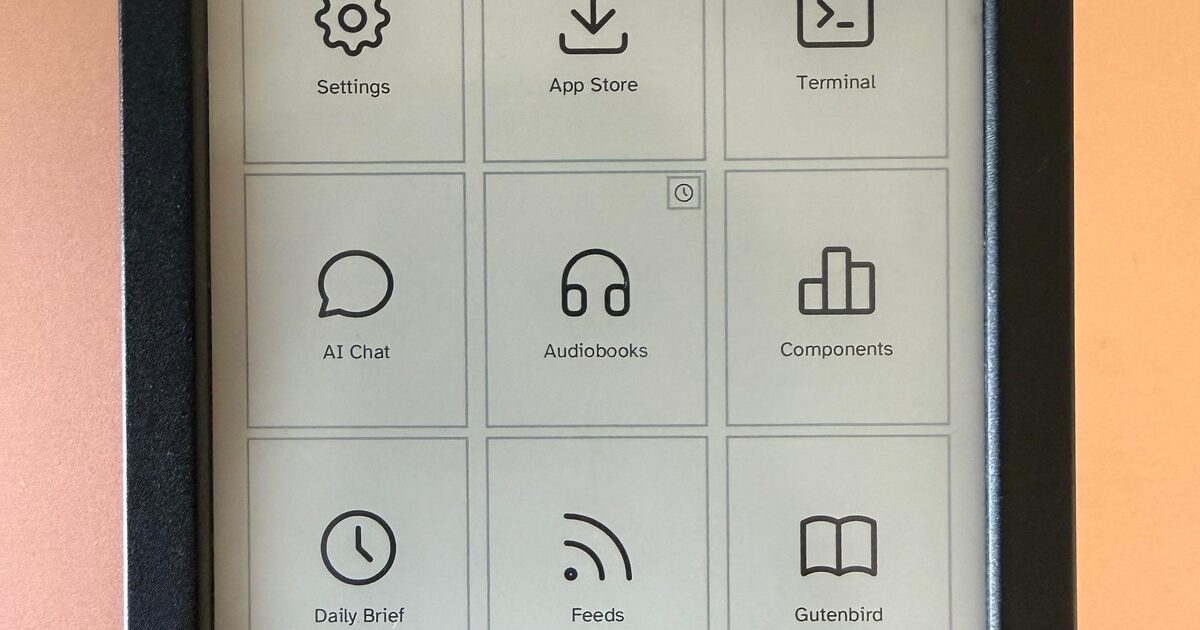
- >These are photographs of the device, not simulator captures
Thanks for the clarification Claude
by wbxp99 - is claude the new sherlock?by m463
- the copy on OP's pages is so full of claude-isms that it quickly became unbearable, for me. the claude-ism you quote above at least made me laugh.by xearl
- FWIW, some Kobos can run PostmarketOS. I built this UI for my Clara - https://www.github.com/bjesus/air . It runs Firefox, Syncthing, KOReader, and basically anything else you can run on Linux.by yoavm
- That's really cool. I've contemplated awesome for a tablet for similar reasons.by nosioptar
- This is something I've considered wanting, and I'm glad it exists, but after some thought it's absolutely not at all what I want my Kobo to do. Much like how I wouldn't bring headphones or a Bluetooth speaker with me on a hike, or a laptop with me camping, I don't even want the option of games or anything other than a good reading experience when I'm using my e-reader. I'd assume this is a redundant take, but I don't even know if my Kobo can produce sounds, and I'd like to keep it that way.
What's tricky is that although I don't want it to be an unconstrained app platform, I do want the ability to integrate with services that host my things to read. Karakeep, RSS, Google Play Books or Internet Archive, etc.. but I think that could be handled in a more narrow fashion.
by brailsafe - Yup. I was tempted to even just install KOReader on my Kobo so I could sync progress with my phone, but I realised I would just get distracted tinkering with it and it's meant to be my distraction-free device.by rbits
- I agree. One of the things I love about my Kindle is that it’s a single-use device, functionally equivalent to holding a paperback in my hands. There’s nothing to distract me or tempt me away from reading. Apps would risk breaking that spell.by mattcasmith
- For the unaware, there is an existing solution that integrates with Kobo's native software (Nickel).
It has been maintained for years, and it supports every Kobo AFAIK.
It's called NickelMenu, and it's great. I'm in the Kobo ecosystem because of NickelMenu and Plato.
One note if you're thinking about getting a kobo due its relative openness: consider getting a two-core device. I did not do my homework and got a Clara BW because I don't want the color display. Later I found out that color is the only one with the two-core CPU.
by the-grump